Weld takeoff from piping ISOs
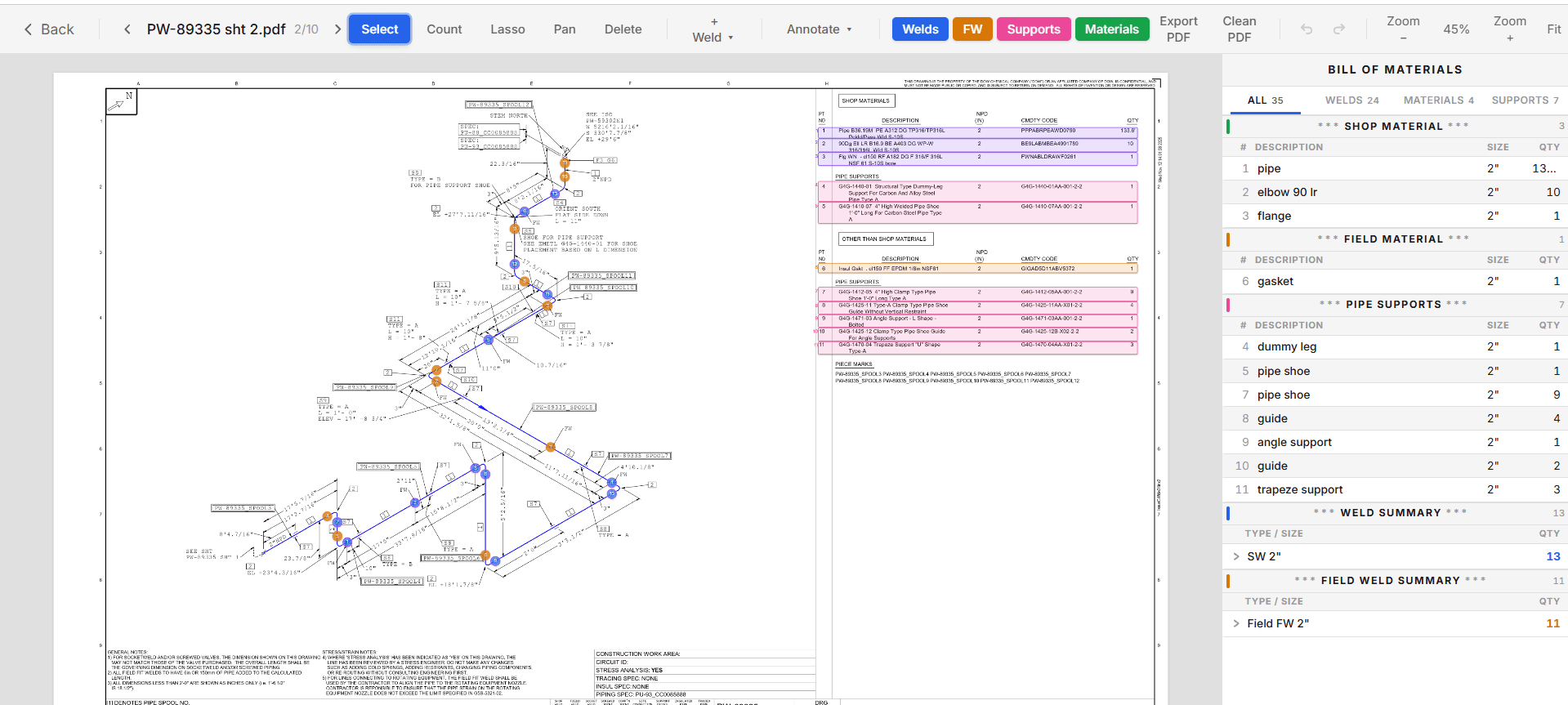
Upload your ISOs. TakeOffTrak finds the welds on each drawing, sorts them by type, size, and shop or field, and marks every one on the drawing. You check the marks, fix what is wrong, and export the counts to Excel.
What it counts
- Butt welds (BW), socket welds (SW), and olet welds, each by nominal pipe size.
- Shop welds and field welds in separate columns. Field welds are picked up from the FW callouts on the drawing.
- Field fit welds (FFW) on butt and socket welds. Each one adds 6 inches of pipe to the materials export for the trim.
- Pipe supports from the BOM, in the same sheet as the welds.
How it finds the welds
TakeOffTrak reads the drawing itself, not a picture of it. It finds the weld symbols in the PDF's linework, picks up the FW and FFW callouts, and then sorts each weld into butt, socket, or olet. It reads the weld symbol styles of many drawing formats.
Scanned or image-only ISOs have no linework to read. On those, TakeOffTrak still reads the BOM, and you place the welds by hand with the weld tool. The app tells you when a drawing is image-only, so it never looks like a drawing with zero welds.
You check it, you own it
Turn the overlay on and scan the drawing. A weld with no marker stands out. Then fix it:
- Add a weld with one click where it is missing.
- Delete a marker that is not a weld.
- Lasso a group of welds and change their type or section in one move.
- Mark a field weld as a field fit weld.
- Undo and redo anything.
The export always matches what you see on the drawing. If you changed it, the count changed.
What lands in Excel
The Weld Takeoff export has one row per drawing per pipe size. Each row carries the spec, material, and schedule, then the shop weld counts and field weld counts by type, the shop support count, and a total. You can export shop welds, field welds, or both.
| Column | What is in it |
|---|---|
| Drawing | The drawing number from the title block |
| NPS | Nominal pipe size of the welds on that row |
| Spec, Material, Type | The piping spec, material, and schedule |
| Shop Welds | BW, SW, and Olet counts made in the shop |
| Field Welds | BW, SW, and Olet counts made on site |
| Shop Supports | Supports from the BOM |
Every count carries its size, so diameter inches are one column of math: weld count times NPS. Your labor units stay yours.
Common questions
- What drawing formats does the weld takeoff work on?
- Vector PDF ISOs from the common CAD packages, including AutoCAD, SmartPlant, and CADWorx output. Scanned ISOs get their BOM read, and you place the welds by hand.
- Can I export only the field welds?
- Yes. Pick shop, field, or both when you export. The field crew gets their count, and the shop gets theirs.
- How do I know it did not miss a weld?
- Every weld it found is marked on the drawing. Scan the drawing with the overlay on. A weld symbol without a marker is a miss, and you add it with one click.
Keep reading
- Shop weld vs field weldThe difference between a shop weld, a field weld, and a field fit weld on a piping ISO, and how to count each one.
- Piping MTOTurn the BOM on every piping ISO into an Excel MTO, split shop and field. Each row is highlighted on the drawing it came from, so every quantity traces back.
- Pipe support takeoffCount shoes, guides, dummy legs, and other pipe supports from the ISO BOM, flag the rows that need a check, and export support quantities to Excel.
- How to take off a piping ISOA piping takeoff from ISO drawings, step by step: title block, BOM, shop and field split, weld count, supports, and the MTO rollup.