Pipe support takeoff from ISO drawings
TakeOffTrak takes pipe supports off the BOM on every ISO, flags the rows that need a check, and puts the counts in your export next to the welds and materials.
What it picks up
When a support is on the BOM, TakeOffTrak takes it off with the rest of the materials and types it as a support. Support types it reads:
- Shoes
- Guides
- Anchors
- Hangers
- Clamps
- Trunnions
- Dummy legs
Each support keeps its size, spec, quantity, and the drawing it came from, and the BOM row is highlighted on the drawing.
Supports that are not on the BOM
When a support is not on the BOM, use the count tool. Pick the item type, size, and spec, then click each support on the drawing. Each click adds one to the count and leaves a marker, so you can see what you already counted.
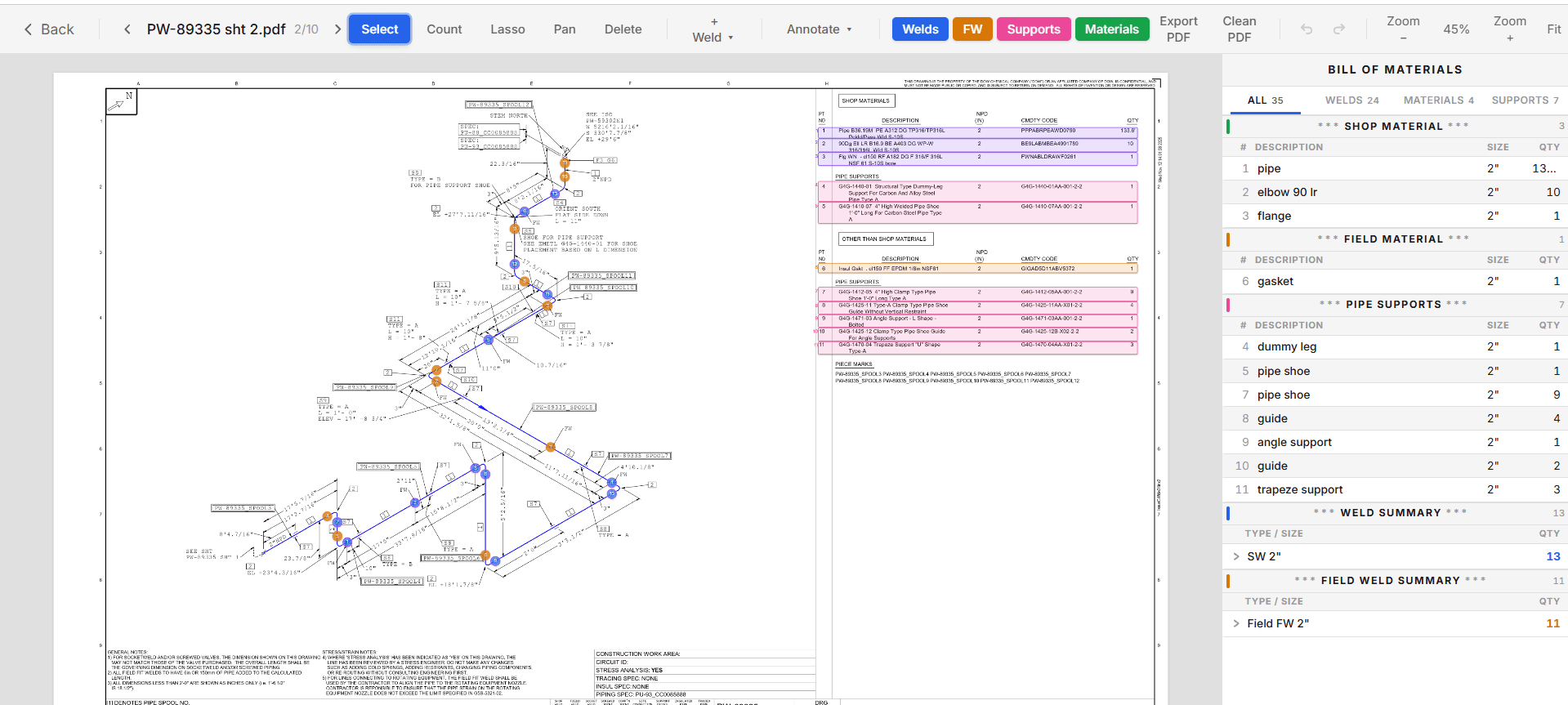
Flags on the rows that need a check
A support with no size, or a quantity that is not a whole number, gets a review flag. Click the flag to go straight to the item, check it against the drawing, and fix it or confirm it.
Where the counts land
- The Weld Takeoff export has a Shop Supports column on every drawing and size row, so weld and support labor price off one sheet. See weld takeoff.
- The Materials export lists every support as its own row, by each, with the drawing number. See piping MTO.
- The Insulation export counts support cutouts per drawing and size. See paint and insulation.
Common questions
- Does it read support symbols off the drawing?
- It takes supports off the BOM. For supports that only appear as tags on the drawing, the count tool lets you click each one, and each click is counted and marked.
- Can I change a support type or quantity?
- Yes. Edit any row before you export. The export matches what you see.
- Do supports get mixed into the weld counts?
- No. Supports sit in their own Shop Supports column next to the weld counts, so each one prices on its own line.
Keep reading
- Weld takeoffCount butt, socket, and olet welds on every piping ISO, split shop and field, and export the weld takeoff to Excel. Every weld is marked on the drawing.
- Piping MTOTurn the BOM on every piping ISO into an Excel MTO, split shop and field. Each row is highlighted on the drawing it came from, so every quantity traces back.
- Paint and insulationGet paint square footage and insulation equivalent lengths from piping ISOs, by drawing and pipe size, with the spec matched from the title block or line list.
- How to take off a piping ISOA piping takeoff from ISO drawings, step by step: title block, BOM, shop and field split, weld count, supports, and the MTO rollup.